
Everything you would expect from your bench coach—and more.
Invite-only this season. Just sign up and you're on the list!
Ready in minutes.
Name the team, add the roster, and Scout builds the lineup you'd build with an hour to think—in seconds, every game.
Let Scout handle it
Scout builds the batting order and every position from who's here, your philosophy, each player's readiness and your league's rules. You review it and change anything.
Customize
Set the batting order, the positions, or both—fill in only the spots you care about, and Build lineup fills in the rest around them.
Copy a previous lineup
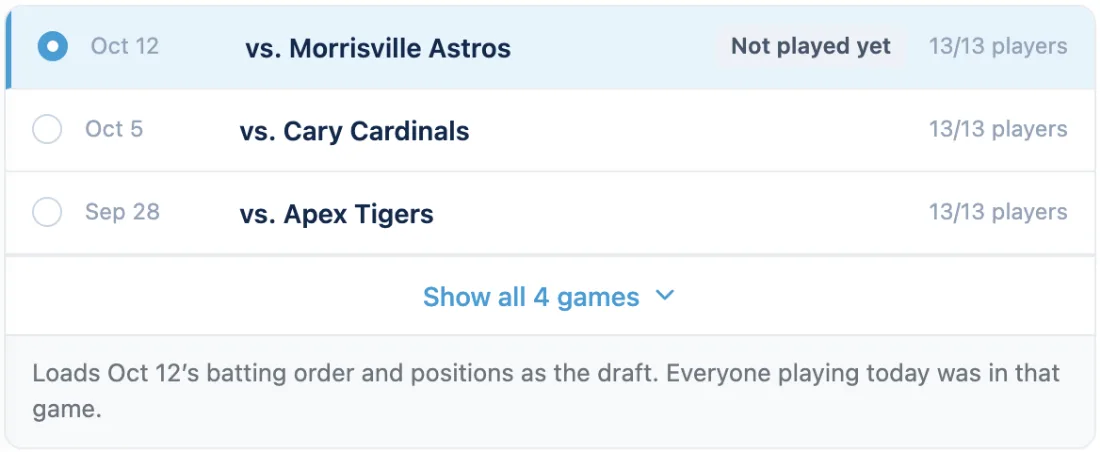
Copy any saved lineup, even one from a game that hasn't been played yet. Then adjust from there.
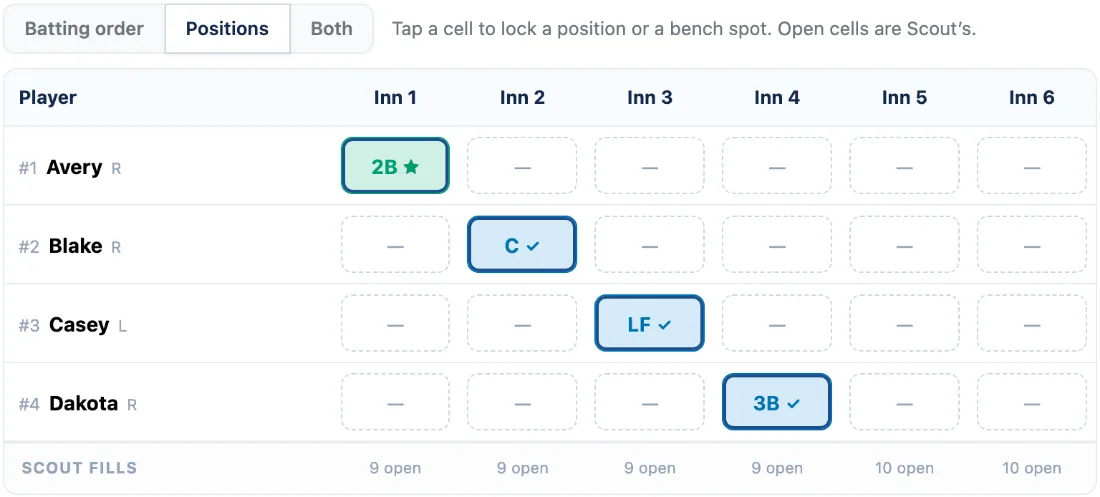
Customize · the spots you fill are kept; Scout fills the rest.
Copy a previous lineup · games already played and games not played yet.
- 1
One-tap lineup
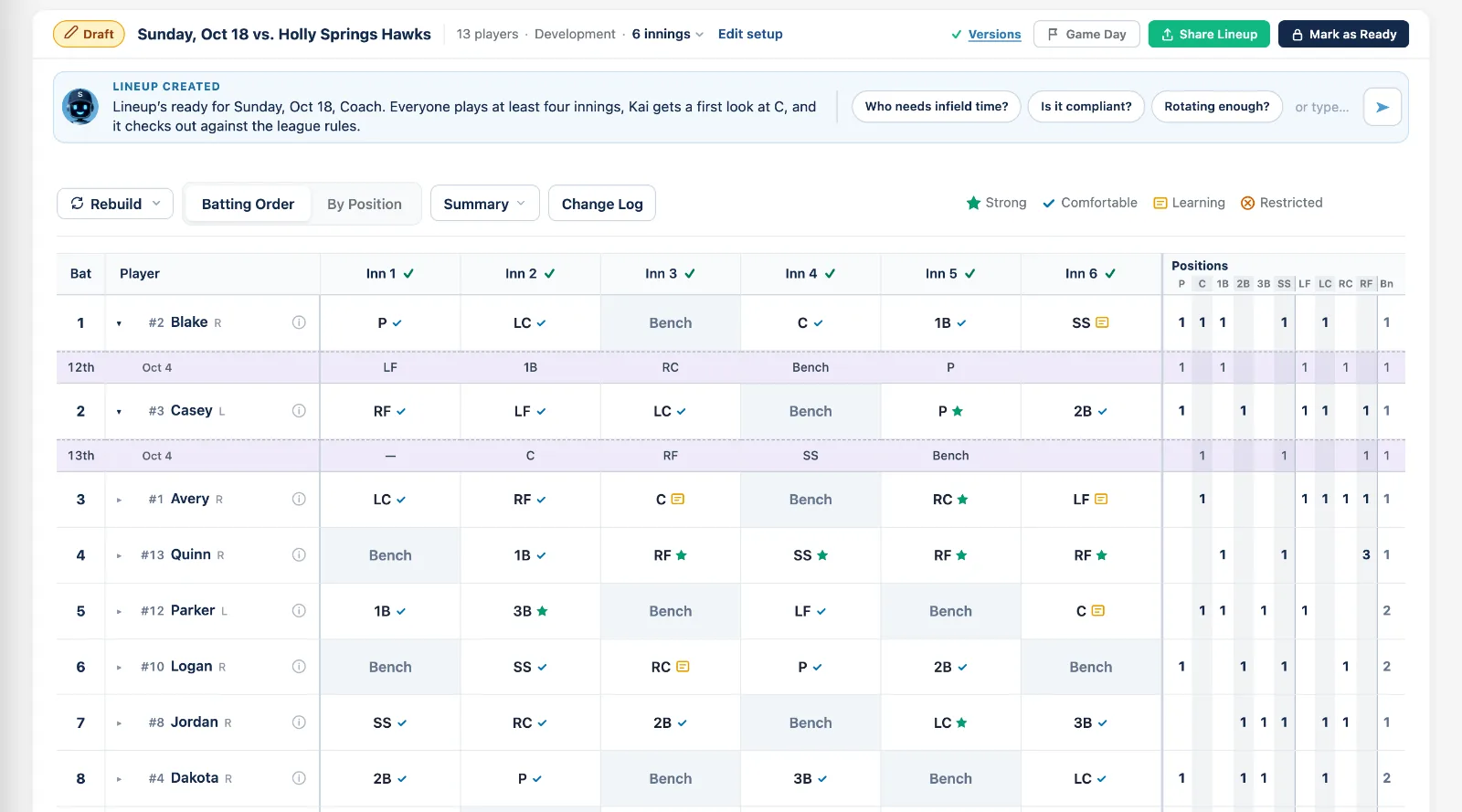
Builds the fielding rotation and the batting order together, in seconds.
- 2
The order rotates
Last game's bottom third bats first next time, and every new lineup mixes the order again.
- 3
Readiness at every position
Rate each player Strong, Comfortable, Learning or Restricted, and the builder keeps them out of the spots you've marked Restricted. If a short roster leaves no other option, it tells you and marks the cell.
- 4
Last game, under each row
Compare today's innings with any recent game or the season, right under each player, and open any player's season game by game.
- 5
Scout's summary
When the lineup is ready, Scout says what it did: the fewest innings anyone gets, who's getting a first look at a new spot, and the rules check.
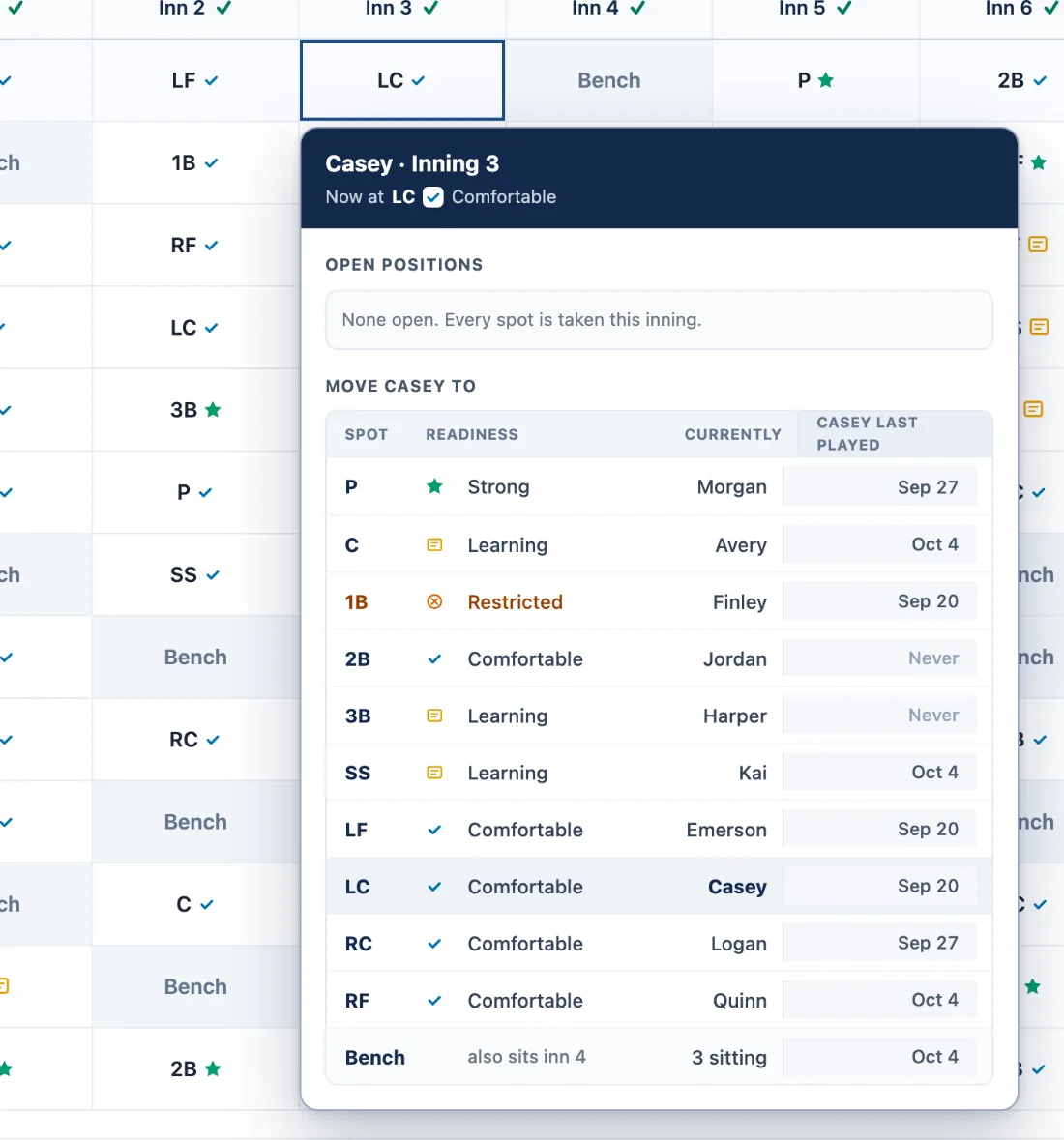
Every move, one tap
Tap a cell to see every spot that inning: how ready the player is there, who's in it now, and when they last played it.
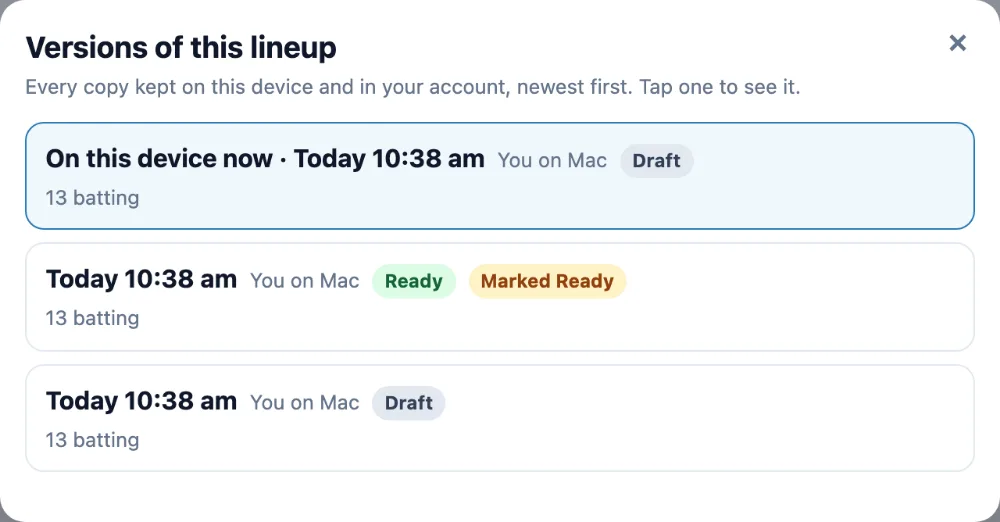
Who saved it, and every version
Every lineup says who saved it, on which device and when, and Versions puts any earlier copy back.
Three philosophies
Balanced, Development or Competitive — the same roster, three different lineups.
Who sat last game
Remembers who sat, and which innings, and won't sit them in the same inning again.
Lock a spot
Lock any position by hand and the rest of the lineup solves around it.
Who's here today
Mark who's playing and who's sitting out before you build.
Your bench rule
Turn on the no-back-to-back bench rule and the builder honors it — and flags it if a change breaks it.
Checked as you build
Every change is checked against your league's rules; an inning with a problem says what it is, right in its header.
Half-finished is saved
Your setup saves before there's a lineup, so a plan you started last night is still there.
Nobody gets lost
Move someone into a taken spot and the player who was there gets a list of open spots, so nobody gets lost.
Rebuild just what you want
A new batting order only, new positions only, or new positions around the changes you made.
Run the game from one hand. Lose the paperwork.
Game Day mode takes your planned lineup into the game. Start the game and it tracks playing time as it actually happens, the piece most coaching products miss. And when changes happen—someone shows up late, leaves early, needs a break—you tell Scout what's happening and the rest of the game re-plans itself. No pencils, no scrambling.
- 1st
Game Day on your phone
Tap a player, record what happened.
- 2nd
Subs in two taps
Tap who's coming out and Bench Coach ranks who goes in — who just arrived, who still has to get in the game, who's sat the most — with the top one marked as Scout's pick.
- 3rd
Late, hurt, or gone early
Someone arrives in the third, leaves in the fifth, or turns an ankle — say so and the rest of the game re-plans. The innings before they arrived count as away, not bench time.
- 4th
Warnings don't stop the game
If something breaks a rule you see it, in amber, with a one-tap "Keep it" — and the override goes in the record.
- 5th
Undo
Forty-five seconds to undo anything you just recorded.
- 6th
Talk to Scout
Use your phone keyboard's mic and tell Scout what happened instead of typing it. Scout needs a connection.
- Final
The record writes itself
Finishing the game writes what actually happened — not just what you planned — into the season record.
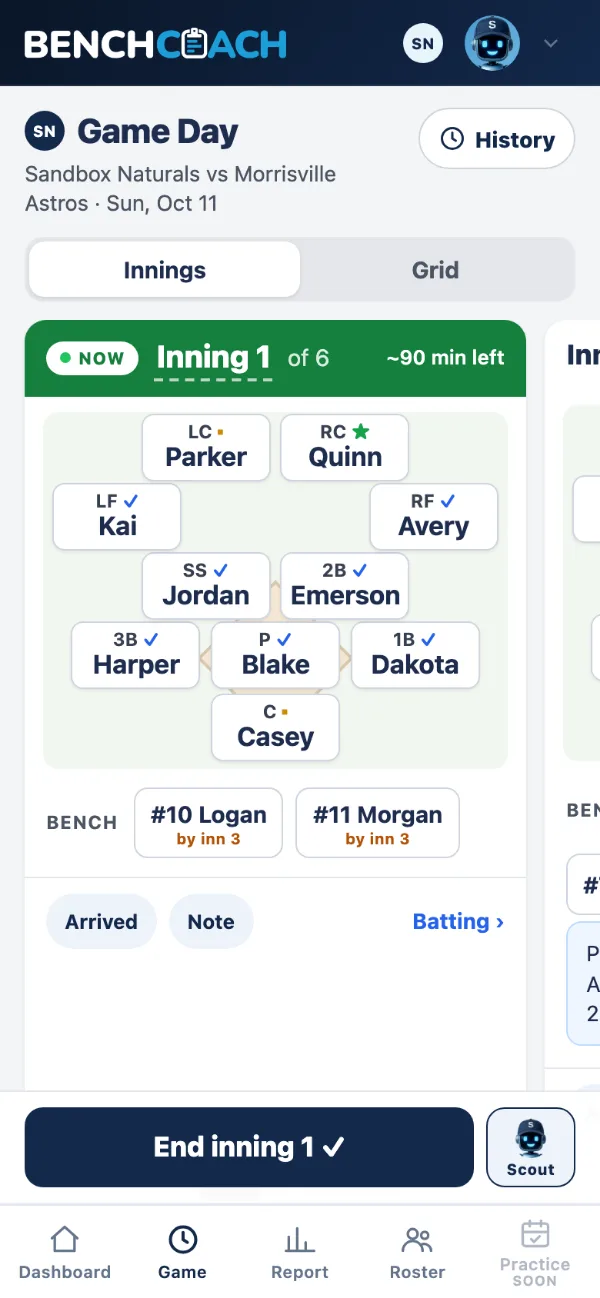
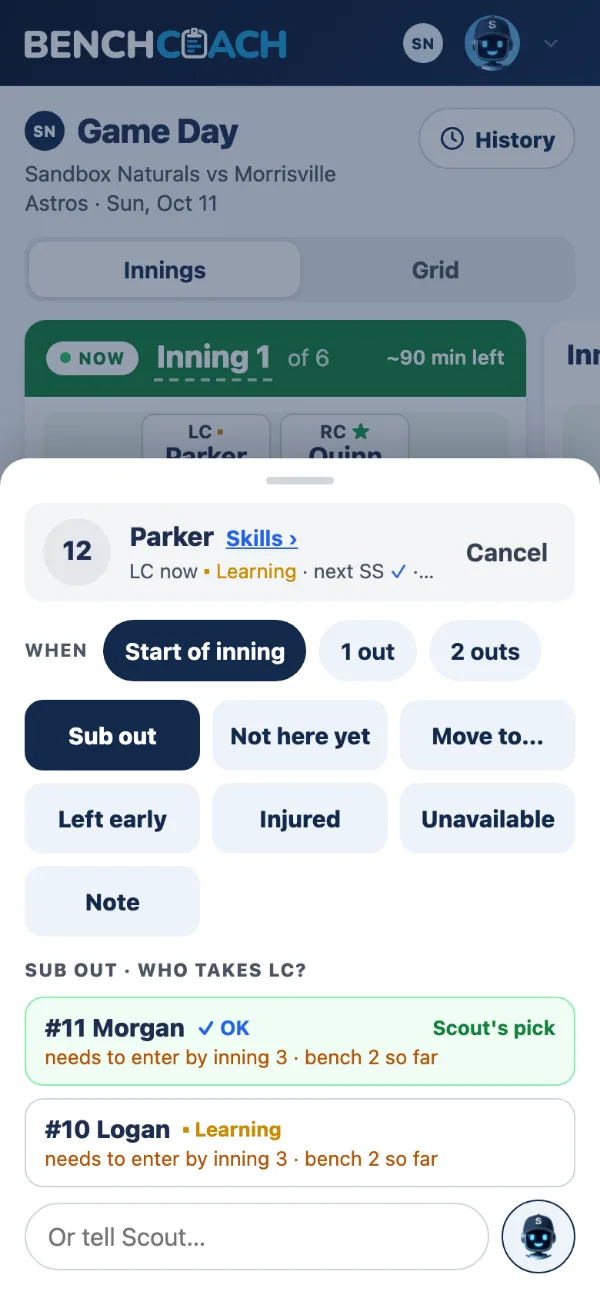
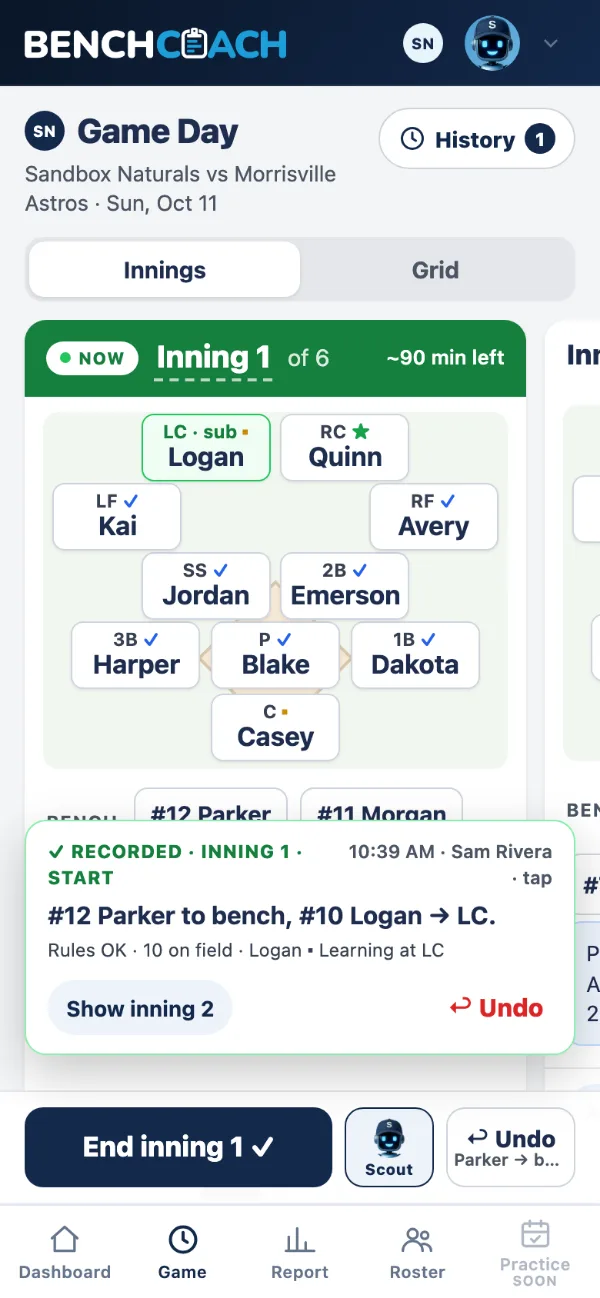
Inning 1 → tap a player → who takes the spot, with Scout's pick → recorded, with Undo.
The link keeps up with the game
Text one lineup link before the game. Once you start recording, it shows the lineup as it actually stands — on a diamond, one inning at a time — and says who last updated it.
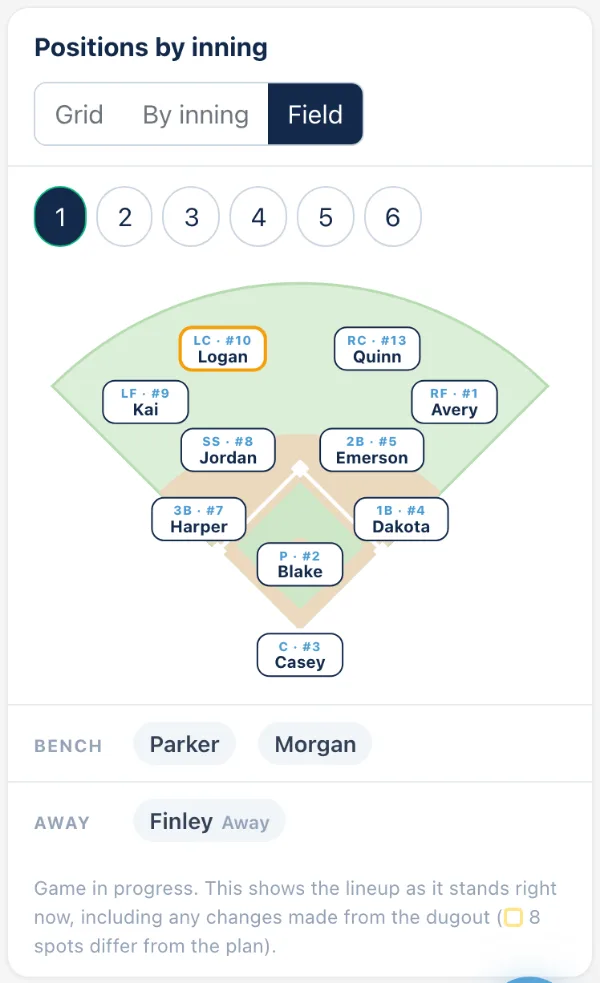
Parents can ask, too
A parent who opens your lineup link or your playing-time report can ask Scout about the game, their player's innings and positions this season, and the league's rules, quoted word for word. Your notes and bench totals stay with you.
Print the card
A one-page dugout card: batting order, jerseys, every inning.
 Intelligence that acts.
Scout notices. You decide.
Scout knows your roster, your league's rules and every game so far—so it speaks up before you have to ask. Ask a question or make a change in plain English; Scout does it, shows you exactly what changed, and keeps Undo one tap away.
Speaks up first
Scout is there for every job
On the Dashboard, the roster, the lineup, Game Day, the lineup card, practice, the season record and the rulebook.
Ask in plain English
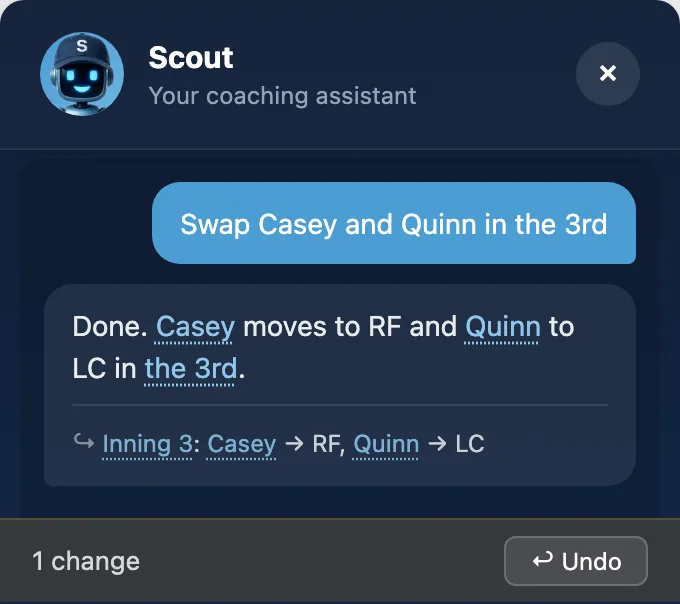
Scout makes the change, shows you exactly what changed, and Undo is one tap away.
Picks up where you left off
The conversation follows you from your phone to your laptop until you clear it.
Season memory
Tell Scout something once — "Dakota is not catching until the new mask arrives" — and every coach on your staff gets a Scout that remembers it, all season.
You can see what was asked
The head coach can read every question Scout was asked, by the staff and by parents.
Quotes the rule, word for word
Ask a rule question and Scout answers with your league's own sentence, the section it came from, and a link to the page. Anything it can't quote, it labels as its own reading.
Ask about any game
Scout can walk you through any earlier game inning by inning, and what changed from the plan.
Know it was fair. If anyone ever asks, show them.
Every inning, every position, every game—recorded from what you actually did, summarized for you, and ready to share with a parent as innings and positions.
Whether every player got their fair share of field innings, counting only the innings they were there. Every inning, every position and every bench shift for every kid, from the games you actually played. Opens after three confirmed games.
Coach view Only you see this.
You see bench time, what changed from the plan, and who goes in first next game.
Who goes in first
A coach-only card names who's short of a fair share and should start in the field next game, plus flags for the most bench and a first look at catcher or pitcher.
Top of the order
Whether everyone has had their turns in the top third of the batting order.
Share view Innings and positions, ready to send to a parent.
Share view shows games, innings, positions and average batting spot — nothing else leaves.
Every link, with an off switch
Every link you've shared, in one list, with Copy, Open and Turn off.
Your league's rules, checked on every lineup.
Every lineup is checked against your league's own rulebook. A problem names the rule in the league's words, and the fix is one tap away.
Rules for every age group
Your league's rules are set up in one tap for every age group.
The rulebook, word for word
Your league's page, stored exactly as written, checked every morning — and you get an email when a section changes.
The basics, every lineup
Players on the field, outfielders, bench limits, innings at one position — checked on every lineup.
No player, regardless of age, position, or skill level, should play 1 position for more than 4 innings per game.Your league's rulebook
The rule, in the league's words
When a lineup breaks a rule, the inning says so and Scout quotes the league's own sentence, with the fix one tap away.
One Google account, every device.
Build the lineup on a laptop, run the game from your phone in the dugout.
Name the team, add the roster, build the first lineup.
- 1
Name the team
Sign in with Google on your phone and your laptop; it's the same team. Run two teams, end a season and keep it, or bring it back.
- 2
Add the roster
Names and numbers from a spreadsheet or a pasted list. Paste your TeamSnap or any calendar link once. Bench Coach keeps checking it, so a moved or canceled game shows up on your schedule. Add your team's logo once; it shows up everywhere, including what you print and share.
- 3
Invite your staff
Invite assistant coaches and set what each of them can do, or a practice helper who sees practices only.
- 4
Build the first lineup
The Dashboard leads with today's game and one button, and the month shows an amber dot on anything that needs you.
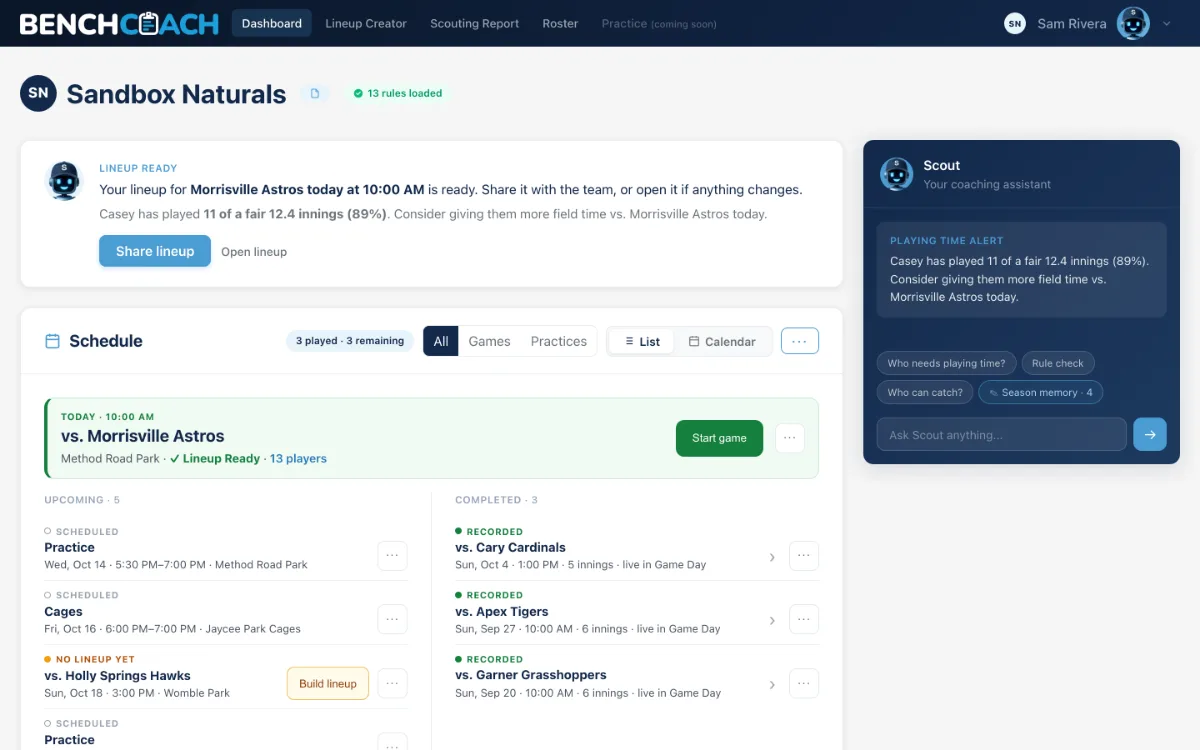
Your own demo team
A full team with a real-looking season under your own account, to click anything you like. Reset in one tap.
Rainouts handled
Mark a game postponed or canceled and it keeps its lineup; give it a new date and the lineup moves with it.
Your data, downloadable
Download everything your team has in one file, any time.
Your Ready lineup stays yours
If another coach changes a lineup you marked Ready, you're told, with See what changed and Put mine back.
Change history
Every save to the team: who made it, on which device, and when.
It emails you when it matters
When your access is decided, when a coach invites you, when your league changes a rule, and when someone changes a lineup you marked Ready.
Practice Coming soon
Practice plans for the practices on your schedule, block by block, shared with your practice helpers.
FAQ
How is this different than GameChanger?
GameChanger records the game. Bench Coach is the bench coach: optimized lineups, substitutions, playing time, your league's rules and the season record—the parts no product has been doing.
What if my league isn't on Bench Coach yet?
New leagues are coming soon—sign up now and get on the list!
Can my assistant coaches use Bench Coach?
Yes, it's built for a staff. Invite them, set what each can do, and everyone works from the same roster, schedule and lineup. Even ‘Practice Helpers’ can be designated and given unique team access, like view-only practice plans.
What do parents see?
A lineup link and the share view of the Scouting Report: innings and positions, no bench counts, no coach notes. From the lineup link parents can even ask Scout about league rules or their player’s innings in that game.
Is my roster private?
Your team's data is yours. Only the coaches you invite (and grant permissions) can see it, and parents see only what you share. The home page uses a cookie-free visitor count, and inside the app we keep a simple record of which pages and features coaches use so we can fix what's confusing. It stays in our own system and never includes a player's name.
Can I change what Scout builds?
Yes—everything. Scout builds it, you always have the final say, and Undo is one tap away.
Does it work in the dugout without an internet connection?
Yes. Bench Coach’s ‘Game Day’ feature continues recording game progress and syncs when connectivity resumes.
What does Bench Coach cost?
Free this season for invited teams.